
Your listing vanished and you did nothing wrong. Here's what triggers a suspension and the exact steps to get your Google Business Profile back.
A suspended Google Business Profile means Google has hidden or removed your listing because its systems flagged something on the profile as non-compliant, and getting it back means fixing that trigger and filing a reinstatement request with proof your business is real and eligible. It is one of the most stressful things that can happen to a local business, and it is usually fixable. Fixing the underlying profile first is exactly what our Google Business Profile optimization work is built to prevent.
I'm Joshua Albanese, founder of Spearleaf, and this is one of the calls I dread getting from a business owner, because I know how it feels on the other end. You wake up, your phone stops ringing, you search your own name, and the listing is just gone. No warning most of the time. So let me walk you through exactly what happened and how to get it back, in the order I would do it myself.
Why was my Google Business Profile suspended?
Google suspends a profile when its automated systems detect a signal they associate with fake, duplicate, or policy-breaking listings. It is almost always a filter, not a judgment about you personally.
Google's own Business Profile guidelines spell out what counts as a violation, and the enforcement is mostly automated. That is important to sit with for a second: the vast majority of legitimate owners who get suspended did not do anything they would recognize as wrong.
Here are the triggers I see most often:
- Editing your business name, address, or phone number, especially several fields at once
- Adding a keyword or city to your business name ("Joe's Plumbing Fort Myers")
- Using a virtual office, a UPS box, or a coworking address as your location
- Being in a suspension-prone category like locksmith, HVAC, garage door, or towing
- A recent ownership change, or many rapid edits in a short window
- A registered agent address that doesn't match where you actually operate
If any of those describe you, that is likely your trigger, and naming it is the first step to fixing it.
Soft suspension vs hard suspension
The single most useful thing to figure out first is which kind of suspension you have, because they need different fixes.
A soft suspension means your listing is still showing to customers, but you have lost the ability to manage it. You log in and the profile is disabled in your dashboard, yet a public search still shows the pin. In many soft cases the fix is simply re-verification, not a full appeal.
A hard suspension means the listing itself is gone. Search your business, and there's no pin, no panel, nothing on Maps. This is the one that stops the phone from ringing, and it requires a formal reinstatement request where you prove the business is real and eligible.
Before you touch anything, search for your business in an incognito window. If the pin is still there, you likely have a soft suspension. If it's vanished, treat it as hard. Getting this wrong wastes days, so I always confirm it first.
How to file for reinstatement
Once you know what you're dealing with, the reinstatement process is a defined path. Do it in order and resist the urge to improvise.
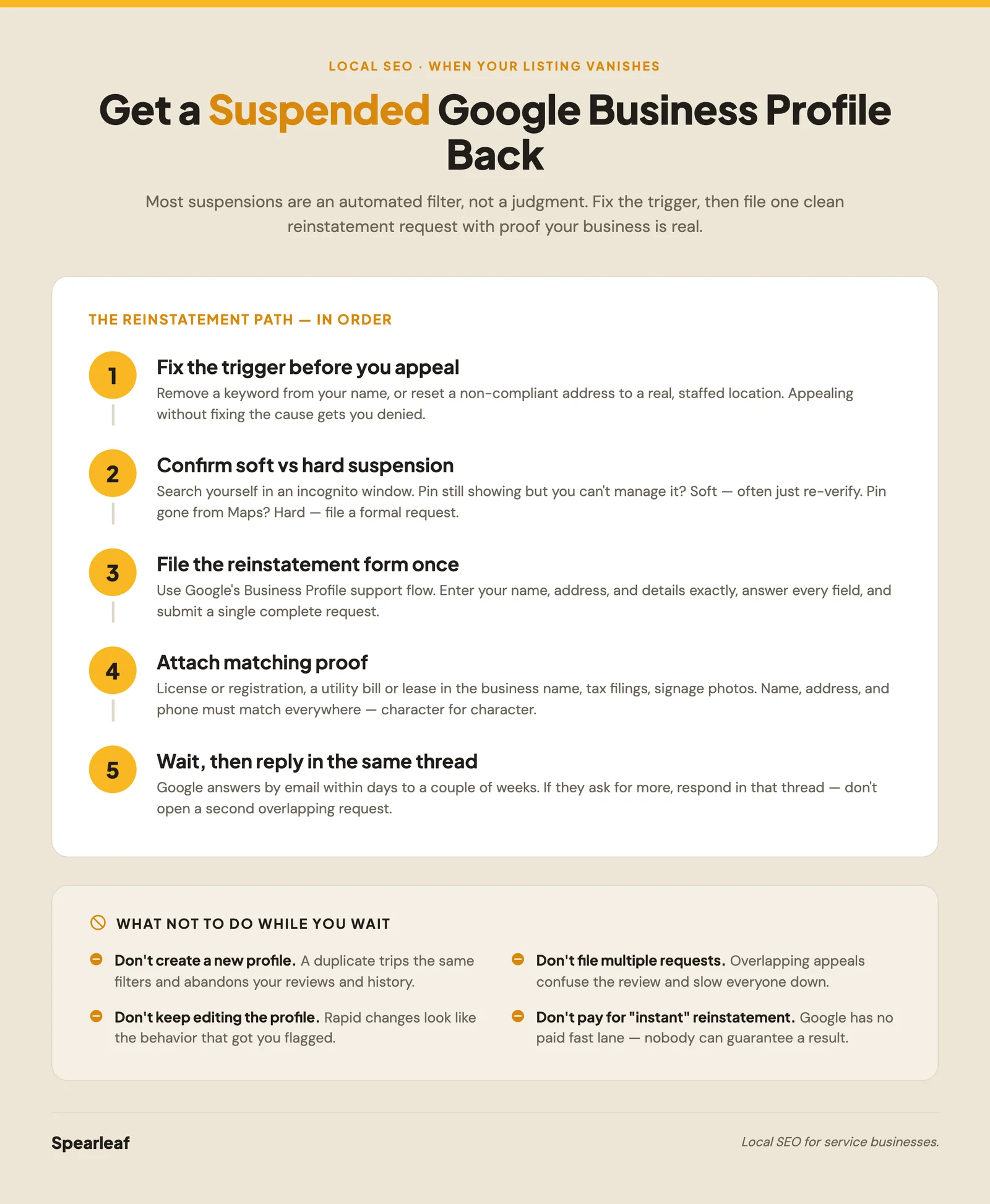
- Fix the trigger before you appeal. If you added a keyword to your name, remove it. If you changed your address to a non-compliant one, set it back to a real, staffed location. Appealing without fixing the cause gets you denied.
- Find the reinstatement form. Google routes this through its Business Profile support flow. Start from the Business Profile Help contact page and choose the suspension or reinstatement path.
- Fill it out once, completely. Give your business name, address, and the profile's details exactly as they should appear. Answer every field. Do not submit three versions hoping one sticks.
- Attach your evidence (the next section covers exactly what).
- Wait for the email and reply in the same thread. Google responds by email. If they ask for more, answer in that same thread rather than starting a new request.
That's the whole path. The part people rush is step one, and it's the part that decides the outcome.
What evidence to include in your appeal
Your reinstatement hangs on one question: can you prove this is a real business operating where it says it does? Give Google clean, matching documents and you make that easy to answer yes.
The strongest evidence is anything official that ties your legal business name to your real address. What I gather before appealing:
- A business license or registration certificate
- A recent utility bill or lease in the business name at the address
- Business tax documents or a state incorporation filing
- Photos of your signage, storefront, or branded vehicles
- Your business bank statement header (you can redact account numbers)
The rule that decides most appeals is consistency. Your name, address, and phone number must match across every document, your website, and the profile itself, character for character. A mismatched suite number or an old address on one bill is enough to sink an otherwise valid request. This is the same name-address-phone consistency that drives normal rankings, which our Map Pack ranking factors guide breaks down.
What NOT to do while you wait
The temptation when your livelihood is offline is to do everything at once. That instinct is exactly what turns a two-day fix into a two-month mess.
Here is what I tell owners to avoid:
- Do not create a new profile. A duplicate listing can trip the same filters and you'll lose your reviews and history. Fix the suspended one.
- Do not file multiple reinstatement requests. Overlapping appeals confuse the review and slow everyone down. One clean request, then wait.
- Do not keep editing the profile if you still have dashboard access. Rapid changes look like the behavior that got you flagged.
- Do not pay anyone promising a guaranteed, instant reinstatement. Nobody can guarantee that, and Google offers no paid fast lane. Legitimate help fixes the profile and files properly; it doesn't buy a result.
If a suspension keeps recurring, the profile itself usually has an unresolved issue, and that pattern is often a symptom of the same visibility problems in our post on why your business might not be showing up on Google.
How to keep it from happening again
The best reinstatement is the one you never have to file. Once you're back, a few habits keep you off Google's radar.
Set your name to your real, exact business name with no keywords or city bolted on. Use a real address where you actually meet customers or, if you travel to them, set a service area and hide the address properly rather than faking one. Make big changes rarely and one at a time, so a batch of edits never looks like a hijack.
Then keep the profile genuinely healthy: real photos, accurate hours, honest reviews earned the right way, and services that match what you do. A complete, truthful profile is both the best ranking asset and the best suspension insurance, which is why we treat it as the foundation of every local program. The system rewards businesses for being real and findable, and that's the same thing that keeps you compliant.
The questions I hear most from owners the week their listing disappears, answered plainly.
Ready to get your profile back and keep it?
A suspension comes down to a clear sequence: find the trigger, confirm whether it's soft or hard, fix the underlying issue, and file one clean reinstatement request with matching proof that your business is real. Do that, avoid the panic moves, and most legitimate businesses get back. If you'd rather have a team fix the profile properly and build it to survive Google's checks going forward, our Google Business Profile optimization is designed to keep service businesses findable in the Map Pack and the AI answers, without the guesswork.
This article was written by Joshua Albanese, founder of Spearleaf, a local SEO and marketing agency based in Fort Myers, Florida. Joshua has built six businesses from zero using organic search and content, and he leads Spearleaf's SEO, AI search, and local strategy for service businesses across the U.S.
Frequently asked questions
How long does a Google Business Profile reinstatement take?
There is no fixed timeline, but most reinstatement decisions land within a few business days to a couple of weeks after you submit the form. Soft suspensions, where you just re-verify, can clear in a day or two. Hard suspensions that need a human review take longer, especially if Google asks for more documents. You will get an email either way. If two weeks pass with no reply, reply to that email thread or open a new request rather than filing three overlapping ones, which slows things down.
Will I lose my reviews if my profile is suspended?
Usually no. Your reviews, photos, and profile history are tied to the listing, not deleted during a suspension, so they typically come back when the profile is reinstated. The listing is hidden from search and Maps while suspended, so customers cannot see it, but the data underneath is generally preserved. The real risk is starting over: if you give up and create a brand-new profile instead of fixing the suspended one, you abandon those reviews and years of history.
Can I still be found on Google while my profile is suspended?
Your website can still rank in the regular organic results, but your listing disappears from the Map Pack and from Google Maps, which is where most local intent lands. That is why a suspension hits so hard for service businesses. The fix is reinstatement, not a workaround. Keep your site and reviews-driven pages healthy in the meantime, because that organic visibility is the traffic you still control while the profile is under review.
Why was my Google Business Profile suspended when I did nothing wrong?
Most suspensions are automated, not personal. Google's systems flag patterns that correlate with fake or non-compliant listings, and legitimate businesses get caught in that net all the time. Common innocent triggers are editing your business name or address, adding a keyword to your name, using a virtual office or a home address you tried to hide, or a category change. It feels like an accusation, but it is usually a filter you can clear with the right evidence.
What is the difference between a soft and hard suspension?
A soft suspension means your profile is still visible but you have lost the ability to manage or edit it, and you often just need to re-verify. A hard suspension means the listing is removed entirely from search and Maps, and it requires a formal reinstatement request with proof the business is real and eligible. Check which one you have before you act. Filing a full reinstatement request for a soft suspension can create more confusion, not less.
Want your profile rebuilt to survive Google's checks? See how our Google Business Profile optimization keeps you findable.
Learn more →