Verifying your Google Business Profile means proving to Google that your business is real and that you're the one who runs it, using video, a mailed postcard, a phone code, or email, depending on what Google offers you. It's the gate between a claimed listing and one customers can actually find, which is why Google Business Profile optimization starts here. I'm Joshua Albanese, founder of Spearleaf, and this is the single most common thing I get stuck helping owners through.
The good news: verification is a solvable problem, even when it feels like Google is stonewalling you. The frustrating news: the process changed a lot over the last couple of years, and most of the advice still floating around is out of date. Let me walk you through what actually works right now, including the parts nobody warns you about.
What are the ways to verify a Google Business Profile?
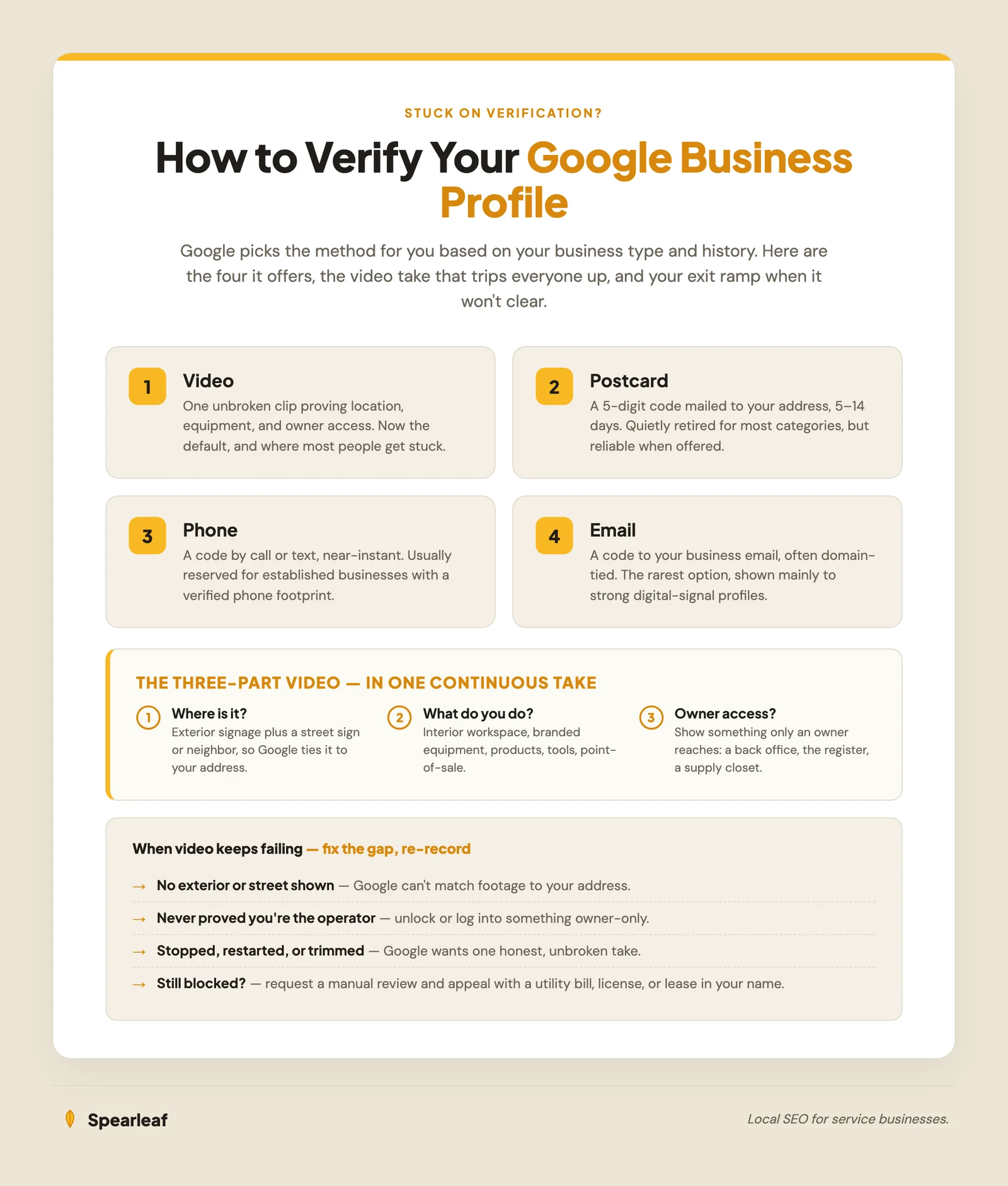
Google offers four main verification methods: video, postcard, phone, and email. You don't get to pick freely. Google decides which options appear based on your business type, category, and account history.
Here's how each one works in practice.
- Video verification asks you to record a short clip, live or uploaded, that proves your location, your equipment, and your owner access all at once. It's now the default for most new profiles, and it's where nearly everyone gets stuck.
- Postcard verification mails a five-digit code to your business address, which you then enter to confirm. Google has quietly retired it for most categories, but it's still the most reliable path when a stable physical address offers it.
- Phone verification sends a code by call or text to the number on your profile. It's near-instant when offered, though Google usually reserves it for established businesses with a verified phone footprint.
- Email verification sends a code to the business email on file, often one tied to your domain. It's the rarest option and shows up mainly for businesses with strong existing digital signals.
If you only see one option, that's Google's decision, not a bug. For most people reading this, that one option is video.
How does video verification actually work?
Video verification asks you to prove your business is real by filming your location, your tools, and your owner access in a single continuous take. Google's own support docs specify these three elements, and the "single take" part is what trips people up.
Think of it as answering three questions on camera, without stopping the recording:
- Where is your business? Start outside. Show your exterior signage, then pan to a street sign or a neighboring business so Google can confirm the location matches your address. For a service-area business with no storefront, show your branded vehicle or a piece of mail with your address.
- What do you do here? Move inside. Film your workspace, your branded equipment, your products on shelves, your point-of-sale system, your tools in the van. Show the actual evidence that you run this specific business.
- Do you have owner access? Finish by showing something only the owner or a staff member could reach: unlocking a back office, logging into your register, opening a supply closet, or accessing a work order system.
Keep it under a minute or two, hold the phone steady, and don't cut. A stitched-together or edited video reads as suspicious and gets rejected.
One practical note for service businesses: you don't need a public storefront. Plumbers, cleaners, mobile groomers, and the like verify all the time by hiding the address and showing branded gear instead. The video just needs to prove you operate the business, not that customers can walk in.
Why does video verification keep failing?
Most video rejections come down to a missing element, not a fake business. Google isn't accusing you of lying; its system just couldn't confirm one of the three things it needs to see. Fix the gap and re-record.
In my experience helping owners through this, the same handful of mistakes account for nearly every rejection.
- You filmed the inside beautifully but never showed the exterior sign or the street, so Google can't tie the footage to your address.
- You showed the shop but never proved you're the operator, so show yourself unlocking or logging into something only an owner reaches.
- You stopped and restarted, or trimmed it. Google wants one honest, unbroken take, not an edited clip.
- Your category is wrong: the video shows a hair salon but your profile says "spa," or you filmed a home office for a category that implies a storefront.
- The lighting or shaky footage was unreadable. If the system can't make out the signage or equipment, it can't verify it.
When a video gets rejected, Google usually lets you try again. Don't just resubmit the same clip. Re-record, deliberately hitting all three elements, and you'll often clear it on the second pass. If you're not sure why yours failed, our guide on why your business might not be showing up on Google covers the related visibility issues that stem from a stuck or unverified profile.
What do I do when I've tried everything and it still won't verify?
When repeated video attempts fail, your path forward is a manual review or an appeal, backed by documents that prove your address. This is the exit ramp Google doesn't advertise well, but it exists.
Here's the escalation sequence I use.
First, request support directly. Inside your Business Profile dashboard, look for the help or support option and choose the callback or chat route rather than the automated flow. A real reviewer can override a system that's stuck in a loop.
Second, gather proof of address before you talk to anyone. Google's reviewers respond to documents. Have ready, in your business name at the profile address:
- A utility bill or lease agreement
- A business license or registration
- A bank or tax statement
- Business insurance paperwork
Third, file a formal appeal if a rejection sticks. Google runs a Business Profile appeals process for listings that were rejected or suspended. You submit the profile, explain your situation plainly, and attach the documents above. Keep your description factual and short. Reviewers process a lot of these, and a clear case moves faster than a defensive one.
A word of caution: don't repeatedly edit your profile while an appeal or review is pending. Every edit can reset you into the queue. Make your changes clean, submit, and then leave it alone until you hear back. Patience genuinely helps here.
How long should verification take, and when should I worry?
Most verifications resolve within a few days to two weeks, depending on the method. Video reviews often come back in a few days, postcards take five to fourteen days to arrive, and phone or email codes are near-instant. Anything past those windows is worth chasing, not waiting on.
If your video review has sat for more than a week with no answer, it's likely stuck in a manual queue, not lost. Reach out to support and reference your submission. If a postcard never arrives after two weeks, request a new one, and double-check your address is formatted exactly the way it appears on other mail.
Timing here matters because verification is the trigger for everything else. Your profile won't show in Search or Maps until it clears, and once it does, the real work begins: choosing the right primary category, completing every field, and earning reviews. That's the difference between a verified listing and one that actually ranks. Our GBP optimization checklist walks through exactly what to do the moment your profile goes live.
The questions I hear most from owners fighting with verification, answered plainly.
Ready to turn a verified profile into real local leads?
Verification is the front door, not the finish line. Once you're through it, whether by video, postcard, phone, or email, the profile only earns you customers if the category, information, reviews, and photos all pull in the same direction. If you'd rather hand the whole thing to a team that gets businesses verified and then builds them into the local results, our Google Business Profile optimization program does exactly that, with no long contract, just the fundamentals executed consistently.
This article was written by Joshua Albanese, founder of Spearleaf, a local SEO and marketing agency based in Fort Myers, Florida. Joshua has built six businesses from zero using organic search and content, and he leads Spearleaf's SEO, AI search, and local strategy for service businesses across the U.S.